Getting a Raspberry Pi to run, using Mac OS

I just installed Raspbian for the second time on my Raspberry Pi (I needed the SD card for my digital camera a while ago…) and had some troubles at first getting the SD card to work on Mac OS because of a “Read-only file system” error. Here’s some instructions, in case you happen to come across the same problem!

  1. Download Raspbian, the operating system to run your Raspberry Pi. I download the latest version here.
  2. Unzip the file you’ve just download – you will get a file with the extension .img.
  3. Make sure the little lock on the SD card is in the “unlocked” position.
  4. Plug your SD card into your card reader.
  5. Check if the SD card is writable: Open the “Disk Utility” on your Mac and click the SD card, then go to the “Erase” tab. If the “Erase…” option (see image) is grayed out, the SD card is not writable. Also, if you try to delete or modify any existing files on the SD card, you may receive a “Read-only file system” error.
  6. I don’t know exactly what causes the “Read only file system” problem, but fortunately I found a solution online:
    Plug in the SD card and go to “System Preferences” > “Sharing” on your Mac. Select “File Sharing” and then the little + sign under “Shared Folders”. Here, you can select the SD card (in my case it’s named “CAMERA”) as a shared folder (see image below). The SD card will now be writable!
  7. Close the System Preferences and return to your Terminal. I got the following instructions from Dag-Inge Aas’ website.
  8. Change into the directory where you have downloaded and unzipped the Raspbian image. In my case I saved the file in “Downloads”:
    cd ~/Downloads
  9. Identify the device name of the SD card by typing:
    df -h
  10. The device name will probably be something like disk1s1 or disk2s1. Then unmount the disk, using the SD card’s device name if it is different from “disk1s1”:
    sudo diskutil unmount /dev/disk1s1
  11. And finally, install the disk image file to the SD card. Make sure the raw disk name, that is the “rdisk1” at the end, is right. It will be rdisk1, rdisk2, etc. depending on the device name above:
    sudo dd bs=1m if=2012-12-16-wheezy-raspbian.img of=/dev/rdisk1
  12. Wait for a few minutes until the image is installed on the SD card. You will then see a message right at the end.
  13. Eject the SD card, plug it into your Raspberry Pi, and off you go!

Stardog ASCII art power

I’ve just installed the Stardog RDF database for the first time (painless. Download, unzip to some directory, set an environment variable, done. TAKE A NOTE, triple stores.) and on server startup I was greeted with this wonderful peace of ASCII art:

screen-shot-2012-11-24-at-01-52-36

You’ve just won me over.

Edit: Downloaded, installed, and loaded one of the example files with Stardog in 2 minutes. User-friendliness win. Now, if you could perhaps explain what that mysterious “-t D” flag is…

$ ./stardog-admin create -n myDB -t D -u admin -p admin --server 
snarl://localhost:5820/ examples/data/University0_0.owl

Without the flag, the loading simply fails with “Authentication failed”. Eh.

Coding Horror: Please don’t learn to code

To those who argue programming is an essential skill we should be teaching our children, right up there with reading, writing, and arithmetic: can you explain to me how Michael Bloomberg would be better at his day to day job of leading the largest city in the USA if he woke up one morning as a crack Java coder? It is obvious to me how being a skilled reader, a skilled writer, and at least high school level math are fundamental to performing the job of a politician. Or at any job, for that matter. But understanding variables and functions, pointers and recursion? I can’t see it.

An interesting blog post by codinghorror.com’s Jeff Atwood on why not everyone should learn to code. I generally agree with the points he makes (don’t learn to code for the sake of it, and don’t do it for the “fat paychecks”), but I also believe that even just the simplest attempts to learn how to code will give people insights into how computers work. This, in turn, will take away some of the myths surrounding computers (“don’t touch that! It will break!”) and maybe lead to a better understanding of what’s going on inside those boxes – we need not only more good programmers, but also digital literacy of the wider public!

Read the complete post on codinghorror.com

Semi-productive procrastination: The LaTeX motivator.

screen-shot-2012-09-28-at-15-53-57

Two things that might be relevant for understanding what I did here:

  1. I’ve recently started learning Python and I love it, thus try to write as much code as possible in Python.
  2. I’ve also recently started writing my thesis, and I try to write as much as possible.

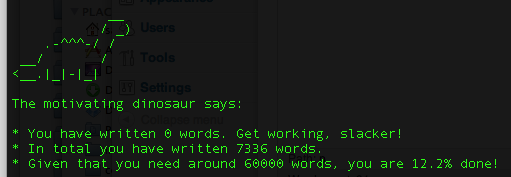
Voila, the “LaTeX motivator” script is born (based on a version by my supervisor… but mine has special effects). Download it off github, copy the scripts (.py plus the .pl wordcount script) into the directory with your tex files, run latex-motivator.py, select your favourite motivating animal, and off you go. Now all you have to do is write a thesis. Easy!

Update: It seems that the stats.csv output is a bit broken. Will fix once I’ve written enough to make the dino happy.

JavaScript for Cats

We all know the internet was invented for the sole purpose of sharing funny images and videos of cats, right? So it’s about time our furry friends (and perhaps their humans, too) learn a little bit about coding. JavaScript for Cats introduces the basic concepts of JavaScript with some simple examples and good explanations. And cat jokes, of course.

It’s easy to code along to the tutorial, as it simply use the Google Chrome browser’s JavaScript console. The site is in its early stages and currently contains only the very basics of JS, but it looks very promising, and there are a few links to other great JS resources at the bottom.

Go to “JavaScript for Cats”

The Semantic Web Layer Cake

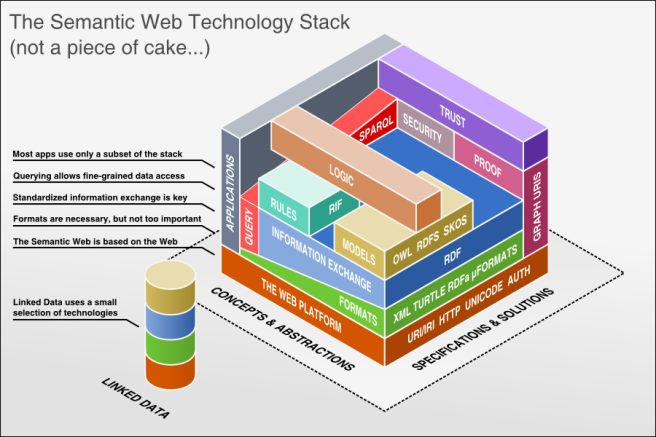
I just came across this 3-dimensional representation of the Semantic Web Layer Stack – or cake-  handcrafted by Benjamin Nowack. The author also links to Jim Hendler’s talk on the Semantic Web Layercake (from 2009), possible the world’s first Semantic Web talk completely in rhyme. Jim’s talk gives a good overview of the evolution of the Semantic Web and how an incredible number of icing, sprinkles and candles was added to the layercake over the years.

semantic_web_technology_stack

The complexity of the stack – both the ‘simplified’ version and the more elaborate one in Jim’s talk – makes me wonder how usable the Semantic Web approach really is. Will there be a point where the technologies converge, some die, others emerge as winners? Or will we live happily with a big messy cake that’s got a little something for everyone?

(via http://mikeleganaaranguren.wordpress.com/2011/03/11/semantic-web-layer-cake-3d/)