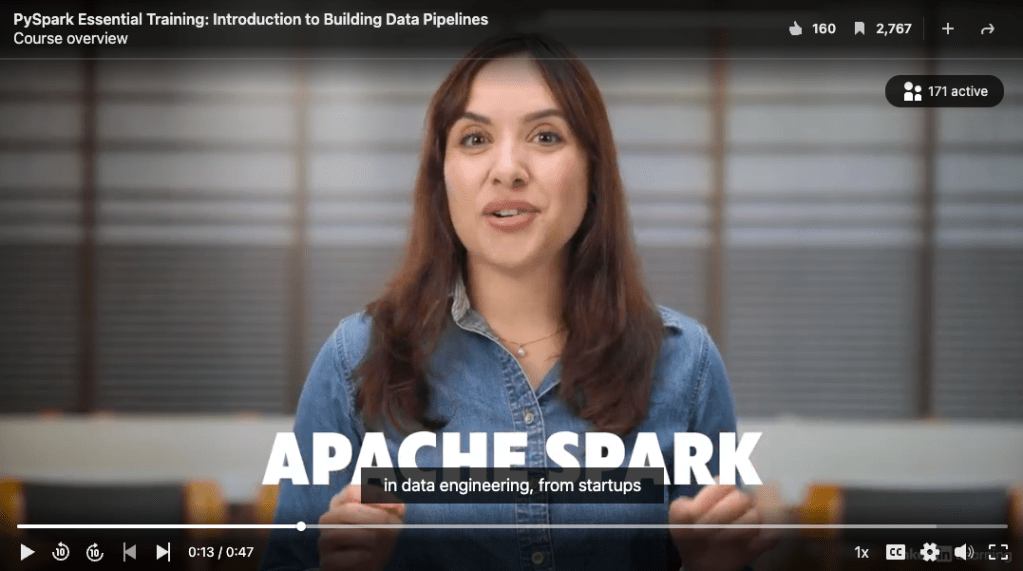
Happy almost 6 month anniversary to my first course on PySpark Essentials that launched on LinkedIn Learning last year! If you’ve always wanted to try your hand at PySpark, this is a great course for beginner to learn data engineering basics with PySpark hands-on.
Here’s the course description:
PySpark is a powerful library that brings Apache Spark’s distributed computing capabilities to Python, making it a key tool for processing large-scale data efficiently. In this course, data engineer and analyst Sam Bail provides a structured and hands-on introduction to PySpark, starting with an overview of Apache Spark, its architecture, and its ecosystem. Learn about Spark’s core concepts, such as the DataFrame API, transformations, lazy evaluations, and actions, before setting up a lab environment and working with a real dataset. Plus, gain insights into how PySpark fits into a broader data engineering ecosystem and best practices on running PySpark in a production environment.
Learning objectives:
Build your understanding of the core concepts of Spark and PySpark.
Understand how to install PySpark, load, manipulate, and analyze large datasets in a notebook environment.
Gain an understanding of how PySpark fits into a wider data engineering ecosystem.
Understand best practices about executing PySpark in a production environment.
I was approached by the LinkedIn Learning team after they found some of my Python courses on YouTube, and we brainstormed several ideas for topics together. While I hadn’t used PySpark in a production setting, I was really excited to dive into it and develop a new course for them! This is the first time I’ve created an on-demand course that actually pays royalties based on streams, which is a lot more scalable than the quarterly live trainings I’ve been hosting for O’Reilly.
In the LinkedIn Learning course, I provide a structured and hands-on introduction to PySpark – perfect for data engineers, analysts, and anyone looking to scale their data processing skills. The course covers:
The core concepts of Spark and PySpark.
Installing PySpark, loading, manipulating, and analyzing large datasets in a notebook environment.
How PySpark fits into a wider data engineering ecosystem.
Best practices about executing PySpark in a production environment.
You can stream the course herewith a LinkedIn Learning subscription – and feel free to like and bookmark the course to provide feedback!
As I’m reflecting on the past two years on the last day of my job at Collectors, as well as the years before that at other organizations, I’m seeing a common thread between what worked and what didn’t work to build high performing data teams. But… let me rewind a little.
When I started at Flatiron Health in early 2014, the entire company was around 25 people, around half of them software and data engineers. When I left the company five years later in 2019, we had grown to around 800 employees (give or take, I lost track at some point) – and despite the hyper-growth, we still had one of the most highly performing engineering teams I have gotten the chance to work with. In my next role, it took me a moment to realize what we were missing that made it feel like the engineers were able to hit the ground running and seamlessly integrate into an existing engineering team or form new teams without major bumps: structured onboarding. For me, structured onboarding consists of two things that are both equally important:
The onboarding document
The “bootcamp” phase
Using these two methods, I have onboarded members on my data teams over the past decade and gotten them to be productive and ready to go after just a week. There are several main benefits of structured onboarding, both for the new team member and the organization:
It significantly reduces the amount of time for the new staff member to be productive.
It reduces the amount of “asking around” the new hire has to do.
It makes them feel welcome – arriving to a prepped and personalized welcome doc shows respect and care for the new hire, and sets the tone for excellence.
In addition to speeding up the time to being productive, it also sets the tone for “how we do things here”, which allows every member of the team to operate quickly and efficiently without wondering (or debating) about workflows or best practices.
The onboarding doc
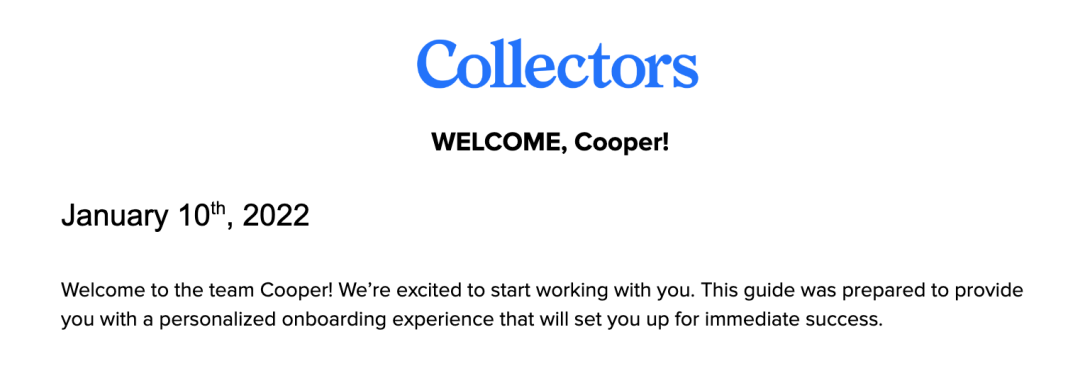
The onboarding doc can be a simple Google doc that’s shared with the new hire on day 1. My onboarding docs look something like this:
A brief personalized intro paragraph and “what is the purpose of this document”. I’m serious, this sounds like a minor detail, but for someone who is brand new in a job and might have absolutely no idea what’s going on, even the smallest amount of help can make them feel more comfortable.
A list of key documents and links, such as:
Company-wide documents and links:
The company intranet page
Any “what does the company do” type document
Org charts
Learning & development, travel, holiday, reimbursement etc. policies
Team-specific documents and links:
The team mission statement and roadmap
Key data platform documentation
The JIRA board (or whatever project planning tool you’re using)
Who to meet:
Everyone on the team – I suggest short 15 minute meet & greets with everyone on the team (if size allows)
I usually pick a list of 5-10 people in different key roles at the company (e.g. product, software engineering, operations, IT, security…) to chat with. If you choose to do this, please prepare as follows so the experience is pleasant for everyone:
I confirm with those people up front that they’re happy to talk to new hires
I make a note for the new hire to message the person first, introduce themselves briefly, and ask if it’s okay to throw a quick meeting on the calendar. NO ONE likes “cold”
The doc also explicitly calls out that the new hire should come prepared with a quick intro and some basic questions (what’s your background, what do you do in your role, how do you use data in your role, etc.).
System access: This is one of the most crucial parts of the onboarding doc and will save everyone a lot of headaches.
This should just link to a separate, centrally maintained list that is kept up-to-date.
A list of every system and tool and how they can get access, e.g. email, GitHub, VPN, JIRA, databases, SAAS products, etc.
Obviously, a lot of these should have been granted to the hire before the start date.
I explicitly ask every new hire to add comments or suggestions to the central systems access doc to improve it or update outdated or incorrect information.
Onboarding plan:
Day 1: What the hire should be doing on day 1. That’s usually just getting access to various systems, joining Slack channels, and reading the “key documents”.
Week 1: This usually includes browsing the code base, exploring dashboards, running dev pipelines, and picking an “onboarding ticket” from a list of quick and easy tasks.
Great onboarding tasks allow the hire to make and test some simple code changes without needing to know too much about the code base. This could be a small refactor (renaming a variable), writing tests, or adding an existing data point to an output.
The “bootcamp” phase
The “bootcamp” is usually the first two weeks where a new hire learns about the company, the product, data, codebase, and best practices for how the team “does things”. These are usually taught in live sessions by the subject matter experts, which allows the new hire to ask questions and clarification. Obviously, the scope of a bootcamp depends on the size of the company and team, but it can include sessions such as:
Company mission statement
Who is who: org chart walkthrough
Product demos (get a product manager to do that!)
Data platform and dashboard demos
“Where does the data come from” walkthroughs
Developer workflows, code conventions, and best practices
How we give and receive feedback on our team
The bootcamp ensures that the new hire gets exposed to key information that’s required for them to navigate the organization. Additionally, it also makes them “drink the kool aid” and shows them how the team operates. This is one of the most crucial points for building a high-performing team: Instead of each new engineer learning from whoever is reviewing their code or helping them get something to work, which may often turn into a game of “telephone”, there is an actual document, slide deck, or some other written documentation of workflows and best practices that everyone knows about from the very beginning.
Bonus for managers: The 30/60/90 document
In addition to an onboarding doc, you may also want to put together a 30/60/90 document for a new hire that lists out expectations of what they should have accomplished at each milestone. There. areplenty of templates out there, so I’m just briefly sharing my personal preference here.
Keep it super simple. One page is enough.
At each milestone, write out what the engineer is expected to be doing with increasing complexity, ownership, and scope depending on their level of seniority: e.g. write SQL queries without help, review other people’s code, lead stakeholder meetings, plan out projects, etc.
I generally split these between technical tasks, team internal tasks, and leadership skills.
Conclusion
Of course, great onboarding isn’t the only thing necessary to build a high performing team, but it’s almost impossible to build one without great onboarding. Depending on the size of your team and organization, onboarding may look different from what I’ve described here, but I hope this provides a good starting point for you. Whether you’re kicking off a brand new team as the first data hire or coming into a more established data team that doesn’t have an onboarding plan yet, spending just a few hours putting together a solid onboarding plan and refining it with every new hire will help set your team up for success.
I don’t really love running. I run marathons. These two things are true at the same time. I started running a lot (like, a lot) during the lockdown 2020 and somehow never stopped. While I do enjoy the actual act of running, the one thing that keeps me coming back to it is the music. My playlists. To me, running is just a different form of dancing – moving your body to music.
As I got more into training for actual races, I noticed that running to music at a certain bpm helped me keep up my cadence and made running a goal pace easier. Running cadence is basically the same as bpm for music, it describes how many steps you take per minute. A higher cadence is generally considered more favorable as it reduces the time spent on the ground, and quicker turnover can help you run faster. I generally aim for 175 bpm for an easy/medium run which gets me to a 9:30 pace with light effort, and faster bpm for faster runs.
You probably know where this is going by now: I’m always looking for a good playlist with my target tempo. There are obviously a bunch on Spotify already, but they’re not necessarily the songs I like. While Spotify recently introduced auto-generated playlists at a certain bpm based on your liked artists, it seems to have a pretty wide margin for the tempo. Since I’ve been wanting to play around with auto-generated code by ChatGPT for a while, I figured I might as well tell the AI to write some code for me. And it went… ok?
Here’s my first prompt, just to test the waters:
>> Can you write me some python code that gets a list of all my liked songs including their ID and bpm from Spotify?
Sure, I can help you with that. To get a list of all your liked songs including their ID and bpm from Spotify, you will need to use the Spotify API and the spotipy library for Python. Here is an example code that should work:
You will need to set up a Spotify developer account and create a new app to get the required credentials for the Spotify API. Then, replace the client_id, client_secret, and redirect_uri values in the SpotifyOAuth call with your own credentials. Finally, run the code and it should print a list of your liked songs with their IDs and BPMs.
That already looked pretty good, so I got a bit bolder and asked ChatGPT to actually give me the full code to add songs based on a certain bpm… and it delivered:
This looked like reasonable code to me. I was particularly surprised and somewhat bewildered that it automatically added the 5 bpm margin. Of course, most human developers would know that a buffer makes sense and ChatGPT just learned from existing code, but it almost felt like it was being smarter than what I asked it to do?
However, when I tried to run the code, I encountered two minor problems:
First, the example didn’t actually add the variables for the authentication credentials in the SpotifyOAuth call that it mentioned in the comment after the code. I had to do some googling to figure out how to set use these and decided to set the respective environment variables instead.
And second, the data model for the object returned by the Spotify API has changed, and the “tempo” now requires a separate API call. I found an example API call and asked ChatGPT explicitly to use the different method to get the “audio features” object:
>> can you write some code that uses the spotipy library to retrieve the audio features for a given track ID
I’ll skip the code snippet it gave me, but I ran the code separately and it ran just fine. Then I put everything together and it… just worked. Playlist created. Job done.
The final result
Overall, this took me maybe 15 minutes to put together, including figuring out authentication (I had already registered for a developer account before). Even though the code is fairly trivial, the biggest help was the API examples and the ability to ask questions about the API. It felt like working with a buddy who just happens to know that particular library and API pretty well and can you point the right way. I actually think I might use this in the future when working with unknown APIs. I’m decent enough at reading library and API docs, but using ChatGPT just really sped things up, even though it initially pointed me to an outdated version of the data model.
I don’t actually know how this would work for inexperienced developers that don’t have a good mental model of how the code should be structured at all and might have struggle with debugging error messages if the code doesn’t actually run. But I feel like for someone who’s written enough code to have an outline in their head and just needs some examples for things like API calls, this might be a great way to accelerate writing code.
The notebook with the final version of the code can be found on my GitHub. And yes, I did run the London marathon with (part of) that playlist!
We recently went through one of our most epic product launches at Collectors: Customers are now able to submit cards for grading to PSA, add them to their collection on the new collectors.com site, and choose to have their valuable cards stored in an actual physical vault. Oh, and all of this will be accessible via a single login, their “Collectors ID”, which replaces the multiple logins customers previously had to manage across our different products and business units like PSA and PCGS. While all these new features are integrated to provide a seamless experience to our customers, we’re dealing with a significantly more complex architecture of multiple new systems, databases, and APIs on the backend. Naturally, as with any new product launch, our product managers were keen to get analytics about the use of these features from day 1: How many users actually converted to the new “Collectors ID”?How many items have customers submitted to the Vault?Who is using the new collectors.com “My Collection” feature?
In order to provide these kinds of data insights right from the go-live, we had to coordinate with several engineering teams to get our hands on the right data and integrate it into our data warehouse. In total, we ended up pulling data from systems sitting on top of four different production databases that were being launched at the same time. Considering how many different systems and databases we were working across, the integrations went pretty smoothly! Within a day of the go-live, I had produced a few dashboards with key metrics that the product and business stakeholders started using immediately to track uptake of the new services. The road to getting there wasn’t straightforward though and involved some amount of scrambling, knocking on different doors, and a few small surprises during the go-live. In this post, I will share some of my lessons learned from integrating with a new production system when you’re looking to provide analytics from the get-go.
Logistics
I’m big on keeping running docs with notes from my conversations and findings when working on a project – I always say I outsource my brain into a Google doc. Keep a doc with (datestamped) notes and “to do” items for every piece of information you find, open questions, as well as a list of who’s responsible for what on the product, e.g. product managers, engineering leads, project managers, etc.
In addition to the running notes, connect with the business stakeholders (product managers, analysts…) early on to document a set of desired metrics along with their priorities and timelines: What do we need to know from day 1? What can wait until some time after the launch? This will also be helpful when exploring the new data models to determine what is actually being captured and what data points may not be available to calculate the required metrics.
If there are standing meetings for the engineering team that’s responsible for the database setup, I strongly recommend regularly sitting in on those meetings. Even if you don’t always understand everything that’s going on, it’s helpful to have the context of what the team is focusing on, and establish a relationship with them. As data engineers, we’re often pretty removed from our counterparts on the data producer side, but knowing the people on the team (and having them know you) can be helpful in working together more effectively.
Infrastructure
Once you know who your engineering point of contact is, the first question you’ll want to ask is: How do we get access to the data? Assuming we’re talking about data that lives in a relational database, here’s a short check list of information you need to get from the engineering team that’s responsible for the database setup:
Find out (and document) what cloud service the database is hosted in
Will you get access to a production database or a read-replica? And what permissions will you get, read-only, or will you be able to create temp tables or views if they’re needed by any of the tools in your pipeline?
Will there be dev and prod environments? What’s the timing for these being available?
How do users and services authenticate against the database? Do we need personal and/or service accounts to log in?
How will the logins will be shared? Will you need access to a shared password storage?
Do you need an SSH tunnel setup to access the database from any of the tools in your data stack?
It’s best to try and get all these details ironed out as early as possible, since especially tasks like setting up SSH tunnels can take some time. Make sure you can access the database as early as possible to avoid surprises later on, even if there is no meaningful data in there yet.
Data model
Now that we’ve covered physical access to the data, let’s take a look at things to consider when you’re working with a new data model. I got looped into the production database design process early on and was able to provide input on the data modeling (see also: establishing a good connection with the upstream engineering teams! They’re your friends!). This ensured that the data would be suitable for our data extraction tool (Stitch) and contained all relevant data. Again, assuming you’re working with a relational database, here are some questions you’ll want to cover when talking about the data model:
Where is the data model documentation and how is it being kept up to date?
For any fields containing value sets, such as status codes, where are the corresponding descriptions stored? Will there be lookup tables in the database, or will these only be stored in code? The latter means you will need to be able to access the up-to-date list of lookups through your infrastructure, e.g. by querying an API (or simply reading the API documentation).
Will there be JSON columns? What is the schema for those?
What are the constraints on each table and column, e.g. foreign key relationships, NULL values, default values?
For datetime fields, will they be stored with timezone (they should)?
Application and data flow
Perhaps most importantly, when trying to make sense of data coming from a production base, we need to understand what the flow of the application is: What workflows (user-created or automated) in the application modify the data in what way? This is absolutely crucial to handling the data correctly and drawing the right conclusions from it. For example:
How and when is a record created, and what fields are populated through what input?
What workflows cause records to be modified in what way? And what metadata is there to track modifications, e.g. a “last updated” timestamp?
Will update timestamps for events such as status changes be tracked in separate fields? Or will there be kind of changelog table that captures these kinds of changes? This also trickles down into your data warehouse models, where you might need to start tracking status change dates right from the get-go.
How are deletions being handled? Will there be “hard deletes”, i.e. the record is simply removed, or “soft deletes”, i.e. the record has a “is deleted” or “deleted timestamp” field. And, along the same lines, is there a data retention policy that means data will be dropped or archived after a certain amount of time?
If the application is replacing a legacy application, will data be migrated? How do you recognize migrated data? Will there be any gaps or differences between migrated and newly create data?
Will there be realistic dummy data (i.e. data that adheres to the constraints and workflows described above) to develop our data models and metrics against?
Is there any chance of any test or dummy data getting into the production system? And if yes, how can we recognize and filter for it?
Ideally, your engineering and database admin teams will already have a “best practice” guide for designing new databases, which usually answers a lot of these questions. Otherwise, this might be a good time to start collecting these kinds of design decisions into a guide and encoding them in setup scripts where possible.
And finally…
I hope that this post has provided you with a starting point for a checklist for your next production data integration. All the questions I’ve covered in the above paragraphs should be treated as conversation prompts to elicit existing design decisions, or help influence decisions that are yet to be made. There will likely be some oversights (I have yet to work with *the* perfect production database), but coming prepared with a plan may help you catch some of the biggest issues to getting a good data integration early on. And even with the best preparation, you can probably expect to make some tweaks after the application go-live to adjust to some last-minute database changes or correct some assumptions you’ve made about the data. Developing against an empty data model or even dummy data can be challenging, and you might not nail everything at first try.
One last thing to keep in mind: As data consumers, our downstream use case will most likely be of lower priority than getting the production system stood up – and that’s totally okay. While I would love for data to always be a first-class citizen, I believe it’s pretty obvious that producing a stable production system needs to take priority, and we just need to accept that resource constrained engineering teams may move slower on supporting a data integration. This is why you’ll want to get started early and get these kinds of tasks and questions on the engineering team’s radar as soon as possible.
I wrote an epic blog post series about my experience building a data platform from scratch in my new job, using the “Modern Data Stack” (well, at least parts of it). The post is an account of my first six months at Collectors building a data platform. It is part memoir, part instructional manual for data teams embarking on a “build a data platform” journey. I figured this might be relevant for some of y’all data engineering folks and/or “data teams of one”, so check it out here: Building a data platform from scratch at Collectors: Part 1(parts 2 and 3 are linked from the post).
Have you ever been out to a restaurant or bar with someone you considered a friend, or maybe a partner, or a date, and it turned out they acted kinda shitty towards the wait staff? Maybe they were unnecessarily impatient, rude, dismissive, entitled, or talking down at people? Or maybe you just witnessed someone acting like that in a public setting and felt some amount of “Fremdscham” (the German word for feeling ashamed for something someoneelse is doing) ? Yeah? That’s because acting like that is generally considered “bad behavior” and most folks are aware of the rules of common courtesy when interacting with other people, usually those in a position of delivering a form of service.
Cool, Sam, but why are you telling me that? Isn’t this like, a tech blog of sorts?
Well, I recently participated in a number of virtual tech events where I witnessed that very same rude, dismissive, impatient, disrespectful, and entitled behavior (yes, this post is a bit of a rant!) from participants towards the organizers and presenters, and it appears to be more of a systemic problem than just a few individuals being annoying.
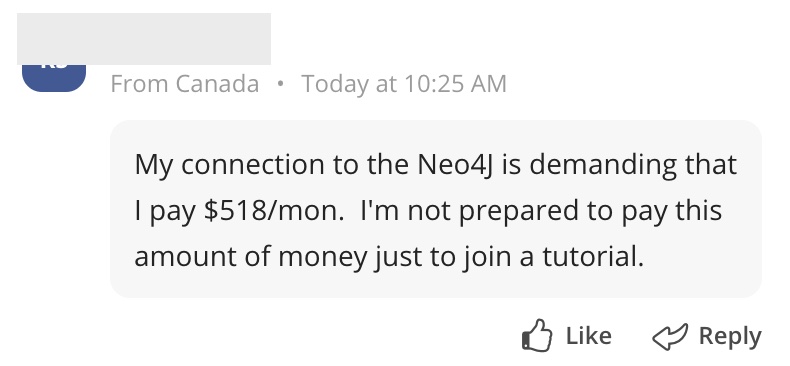
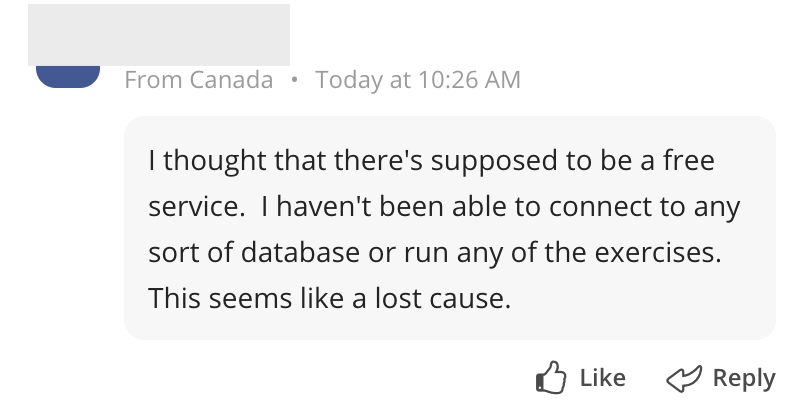
Here’s an example from a free live training session I recently attended that was the catalyst for this blog post (note the timestamps for the correct order):
The presenter had clearly explained and demonstrated two free options for using the software at the beginning of the hands-on part, and the teaching assistants in the course had responded to every single one of the participant’s questions. And yet, he posted himself into a rage and acted like a complete ass. I can’t imagine that he’d act like that around his office – and if he did, I hope the company would tell him very clearly that’s not acceptable behavior.
(As an aside, another participant joined the live training 20 minutes before the end of the 2 hoursession and demanded someone explain to them how to get started. The training was definitely interesting.)
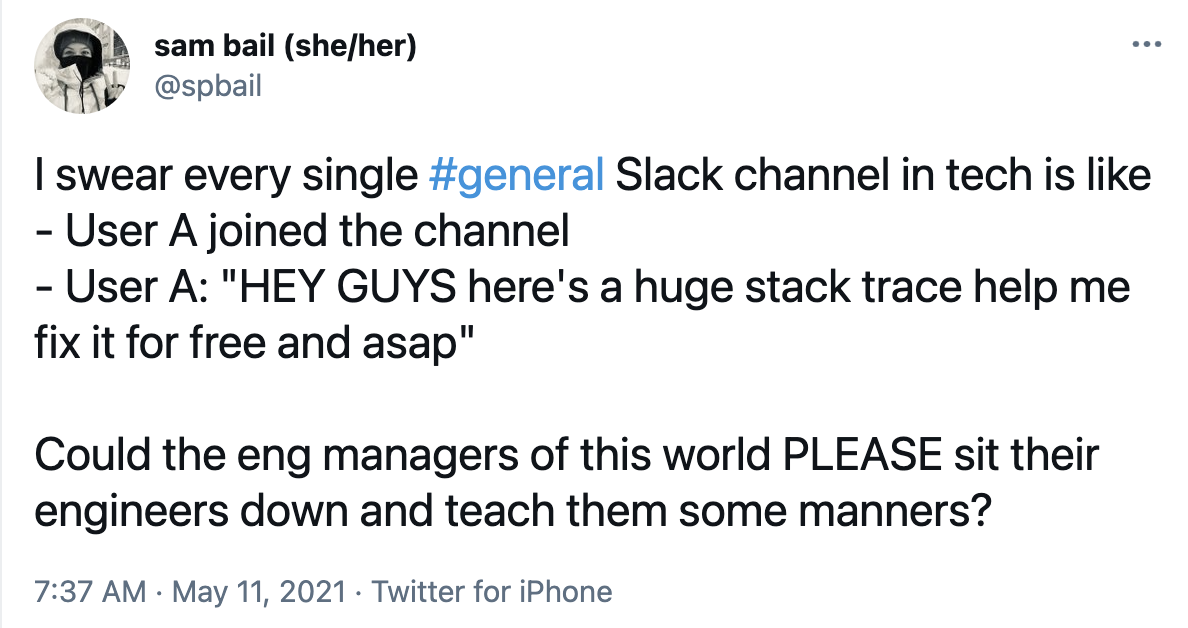
Another example for interactions that are not necessarily disruptive but just look bad are folks asking for help in Slack channels. I just posted about this on Twitter a while ago:
I’m in a quite a few tech Slack channels and I used to be a maintainer of an open source project, and the typical behavior I notice is:
New user joins the channel
Immediately posts a question asking for support, often dumping an entire error stack trace into the channel with no warning
Frequently cross-posts the same question in other channels
Occasionally posts several “anyone?” type follow-ups
(Rarely) posts some annoyed or frustrated comment when they don’t receive help
“HELP ME”
Maybe I should care less about these kinds of things, but man, seeing this is annoying. I’ve muted most Slack channels I’m in because of too many Fremdscham-inducing interactions. Especially in open source communities, this sort of Kool Aid Man behavior (kicking down the virtual door but going “HELP ME” instead of “OH YEAH”, you get the idea) makes you wonder where people left their manners.
Another version of this is the “mouse asking for milk” behavior, which often follows Kool Aid Man behavior once someone receives help. For those that don’t know, the popular children’s book tells the story of a mouse that receives a cookie, then proceeds to ask for milk (to go with the cookie), a straw (to drink the milk), and other favors. This often has the effect of pressuring the helper to dedicate more time and implicitly puts the responsibility of solving the issue on them instead of the original question asker: “If you don’t continue to help me, you’re letting me down and I can’t solve this problem”.
Look, I understand that we’re all trying to get to results as quickly as possible. Fixing bugs and production fires, figuring out a configuration after banging our heads against the wall for hours, trying to get something to work while following along with a live instructor, all these things are annoying and stressful and make us impatient and want HELP. NOW. But we always have to keep in mind that the people on the receiving end are also just… people. Who are usually trying their best to be helpful, but they might have their own stressors, deadlines, time schedules to stick with, and might not have the capacity to drop everything and help. And maybe you’re the one who’s causing the thing to not work (if you’re in tech you’re guaranteed to have had that experience) – might be time to take a step back and take a break.
I’d also like to clarify that I’m not talking about obviously “bad” or illegal behavior. While many meetup groups, conferences, and open source projects have a Code of Conduct, most of the behavior I refer to is not necessarily a violation of a Code of Conduct, but just generally unpleasant. But keep in mind, just because it doesn’t go against any of the rules doesn’t mean it’s not disruptive, disrespectful, or just plain annoying to the organizers, presenters, volunteers, and other participants. And it makes you, and potentially the company you represent, look kinda bad.
How to not be “that person”
So here’s a thought for folks attending any kind of (virtual) events or participating in Slack communities, message boards, Reddit, GitHub conversations, and other communication channels. I don’t know if anyone’s reading this who should be reading this, but here we go. Before posting anything, ask yourself the following questions:
Did I read the “welcome” message and instructions of where to post what?
Am I posting in the right channel?
Is my question clear and can people actually help me based on the information I’m providing?!
Did I use the search functionality to try and see if this question was already answered?
Am I asking an unpaid volunteer to do extra work? Have I already taken up a lot of their time?
Am I being respectful and mindful of people’s time and other responsibilities?
Would I post these kinds of things in my company chat, or say it out loud in a team meeting when my peers and managers are around?
Can I wait until it’s a good time to ask that question?
And even after posting a question, there are some things you can do to make everyone’s life easier:
Check whether someone actually answered the question, or asked for more details. Respond in a timely manner, or at least let them know that you will get back later.
Said differently, pay attention and understand that if someone responds to you, they dedicated time to helping you. Be respectful of their efforts.
If you don’t get the help you need, well, so be it. Unless you’re talking to the customer service of a service or product you pay for, you are not entitled to receiving any help, like, ever. And even if you’re paying for the service, keep in mind that customer service staff are humans you should treat with respect. Be persistent if you need to. But for goodness’ sake, please be nice.
If the problem is resolved, post that you solved it and ideally, share your solution! This will help people later on, and lets people know that you no longer need help.
Tell your coworkers to not be “that person”
And for the managers out there: I know you’re not responsible for how your reports act outside of the work environment, unless that employee is explicitly there to represent your company. But we all know that the workplace implicitly extends beyond the boundaries of your company’s office, Slack, or email, and that employees are often seen as representing the company in the “outside world”, whether that’s good or bad. If your reports or coworkers (or managers…) behave disrespectful or somewhat disruptive (again, without necessarily violating any Code of Conduct) in an “extended work” setting, that’s just going to look bad and quite possibly make people question your company culture and what kind of people you hire. Well, it definitely makes me question what your company culture is like.
This isn’t an easy conversation to have, but I do believe that any company that onboards new employees likely shares (should be sharing?) some form of “rules” of communication, their company values, or other training that usually boils down to “don’t be rude“. It should be easy enough to include that this also applies to external venues such as (virtual) conferences, Slack channels, message boards, meetups, and other spaces in which the employee is present in a somewhat work-related context and may be seen as representing the company.
And for the presenters, maintainers, and volunteers out there…
Hey there, I see you. Well, I am you. I run workshops, teach coding classes, give conference talks, and help out in tech Slack channels. And I know that putting yourself out there and doing stuff out in public, whether that’s as a volunteer or part of your job, always comes with some amount of pressure and anxiety. Dealing with people who are rude or impatient is never pleasant. Here are some thoughts on how to help with this:
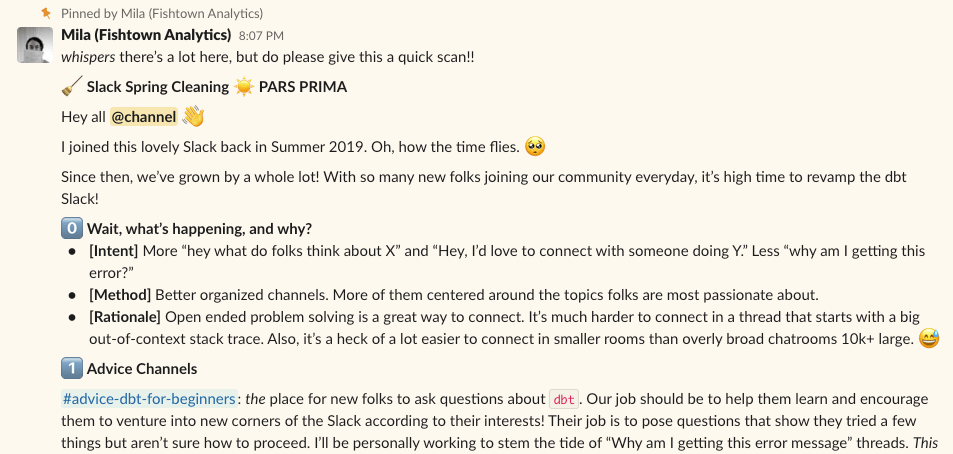
1. Set automated welcome messages in Slack and other communication channels explaining to folks where to post and how. Based on my experience, you can expect some proportion of people to actually read them, and some proportion of that to follow the rules. There will always be people who don’t pay attention, but you can make sure that the rules are actually enforced through gentle reminders: Ask your staff or volunteers to nudge people to post in the right channels, which (hopefully) also will be noticed by other members who will help with that. The dbt folks are pretty good at directing their Slack traffic to the right channels using welcome messages and periodical friendly reminders, see the screenshot below.
2. Add an “FAQ” page to your organization’s website.Reshama Shaikh, a data scientist who’s incredibly active in the NYC tech community I’ve been lucky to collaborate with for years now, recently pointed me to the FAQ page of Data Umbrella, a volunteer-led community group she founded. The FAQ cover a range of questions such as “can you give me career advice” and “can you help me find a job” and kindly point out that the group is entirely run by volunteers who give up their free time and pay out of their own pocket for any kind of expenses (such as MeetUp fees).
3. Have a slide on “How we communicate” rules at the beginning of a talk or workshop. In addition to highlighting the Code of Conduct, you can remind people when and how to ask questions, to use the search function, mention that the talk will be recorded and how the recording will be shared. If you have helpers or TA’s, ask them to enforce those rules, e.g. by posting reminders to hold questions, that the talk will be recorded, or links to the material.
4. Make technology work for you. Honestly, this might be a little dramatic, but see item #1 – there’s going to be a certain number of people who don’t read the rules. One way to make technology work for you, in addition to automated welcome messages, is to lock down the “general” Slack channel to allow only staff announcements, which is a good way to avoid the “new user support question dumping ground” effect. Another option to consider for any kind of live event is to only allow participants of a to join until a few minutes into the event, which avoids people not catching parts and then demanding help 45 minutes into a session.
5. It’s ok to not please everyone. I used to have the “will to please” like a freaking Golden Retriever. But you know what – it’s ok to say no, ignore people, or tell them to wait, for the sake of your own sanity. If someone comes into an event 30 minutes late and you’re a presenter or assistant already juggling several participants, well, maybe the person who came late simply won’t get lucky today and will have to figure things out themselves. Be kind, but firm, and let them know that you won’t be able to catch them up. Sorry. Likewise, if you’re helping someone out in a Slack channel and the mouse asks for more milk, it’s ok to let them know if you don’t have the capacity to help them any further… unless you are working in customer support of course and uh get paid to do exactly this. Otherwise, allow yourself to say no if this is turning from something you enjoy into a chore.
And finally…
I focused a lot on the “don’t make your company look bad” argument in this post, but I think it’s also important to point out that general kindness and respect towards people who dedicate their time to maintaining software, running workshops, giving talks or presentations, should be a given. Whether that’s paid or unpaid, we all need to consistently make an effort to see the person on the other side and man, just give em a break. Chill. Be nice. Accept the fact that sometimes you can’t have it your way. It’s ok. The world won’t end.
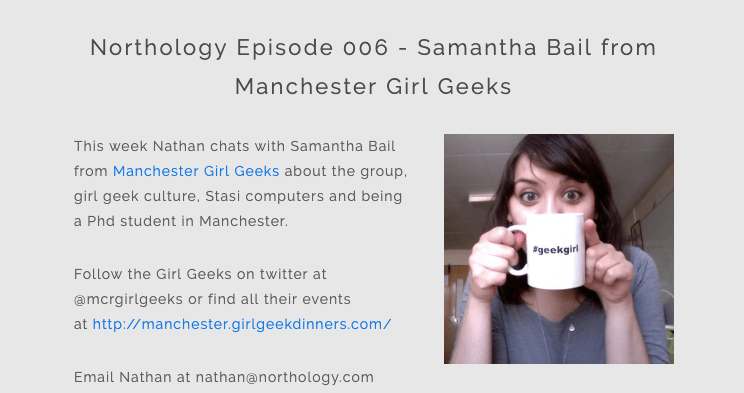
In case you missed it, I lived in Manchester for 5 years and somehow developed a proper Mancunian accent. Somehow I ended up on Nathan Rae’s podcast “Northology” in 2013, talking about Manchester Girl Geeks, a not-for-profit community group I co-founded a few years prior (they’re still going strong, 10 years later!). If you want to listen to 30 minutes of me being proper Northern, the recording is still online.
I already showcased a gallery of Hackathon t-shirts I designed for our Flatiron Health hacks a few posts back. Of course, Hackathons are much more than just t-shirts, so earlier this year my fellow engineer Ovadia and I wrote up a 2-part series of blog posts about Hackathons.
After a couple of major production fires on our analytics pipelines that required us to drop everything and push through several migrations, my fellow engineer Zach and I looked at each other and admitted that “this was terrible, but things are actually much better now” – and so, the term “Crisis Driven Development” was born. We shaped up our ideas around the concept enough to talk about it at an engineering all-hands at Flatiron Health, and followed up with a couple of blog posts.
Zach’s post (the first part of the saga) focuses on how to be in a good spot to actually keep pushing forward during production fires instead of rolling everything back, and emerge on the other side in a better state.
The second part that I wrote then takes a step back and thinks through what makes ‘Crisis Driven Development’ so successful, and how we can apply those principles to a regular development cycle instead of a crisis – a controlled burn, so to say. And while none of this is entirely new, I do like how it can introduce a slightly different way of interacting and working together than the go-to mode of agile sprints and tickets. Let me know what you think – feel free to comment here, on Medium, or hit me up on Twitter.









 Sam Bail
You must be logged in to post a comment.